Higgsfield AI Review 2026: I Tested It For Weeks (The Truth)
I tested Higgsfield AI for weeks on real projects. Here's my honest review of features, pricing, quality & what's missing — read before you spend a cent.
⚡ Quick Verdict
Cinematic quality video output that rivals $5K cameras
Concerning clauses in their Terms of Service
The Bottom Line
Higgsfield AI is one of the best AI video generators available right now. The output quality is genuinely cinematic, character consistency is strong, and rendering is fast. At 4.5/5, this is a top-tier tool — but it’s not perfect. Credits burn faster than you’d expect, and their ToS has some clauses worth reading carefully.
Why I Tested This Tool
Every week there’s a new “revolutionary” AI video tool. Most of them produce content that looks obviously AI-generated. I spent weeks putting Higgsfield through real-world projects to see if it actually delivers on its promises, or if it’s just another hype machine.
What Is Higgsfield AI?
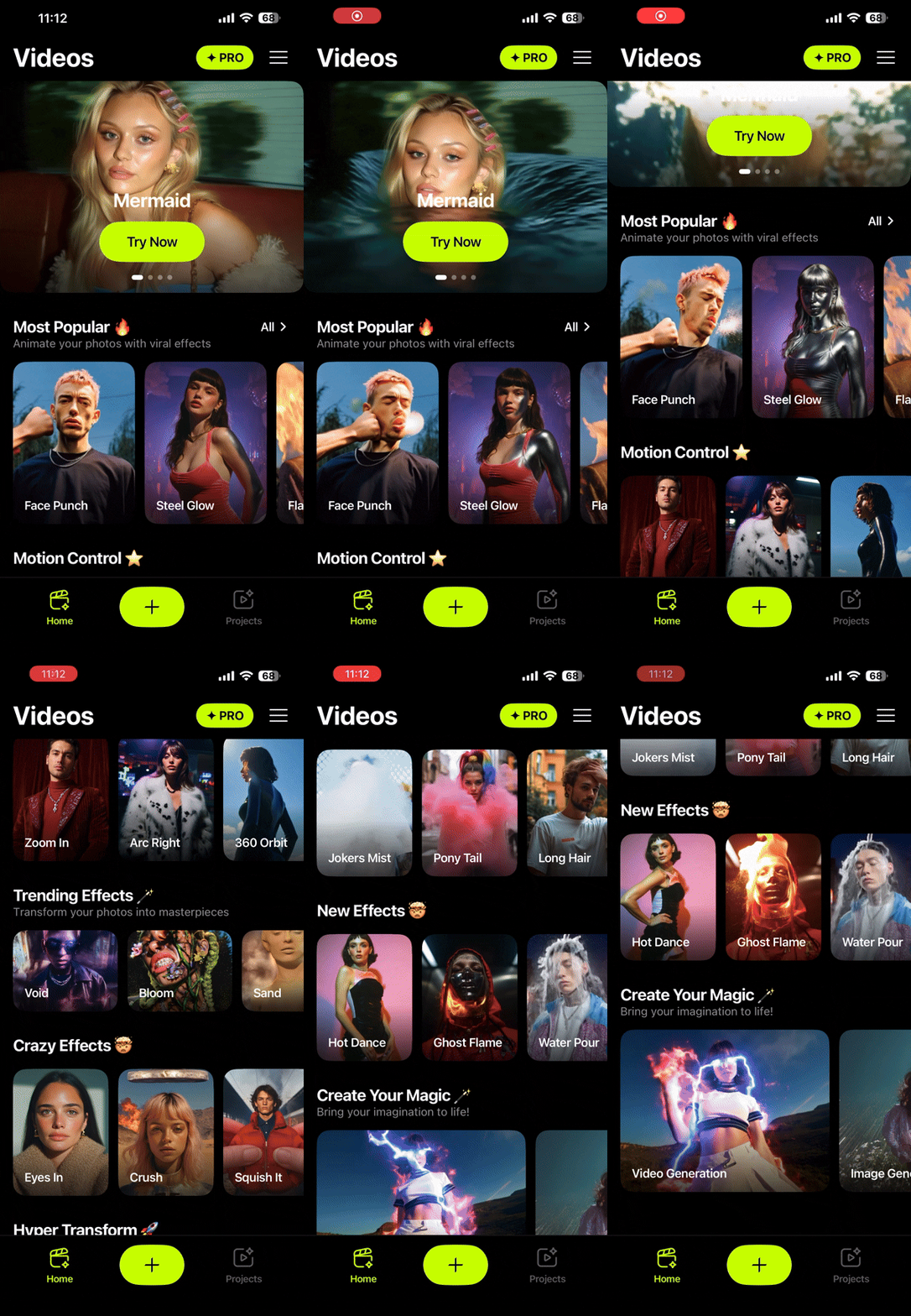
Higgsfield AI is a text-to-video and image-to-video generation platform. You type a prompt describing what you want, and it creates cinematic video clips. The standout feature is character consistency — if you create a character in one scene, you can keep that same character looking consistent across multiple scenes and shots.
My Real Experience Using It
Here’s what actually happened when I used Higgsfield for client work over several weeks:
The quality blew me away. The first video I generated looked better than footage from cameras costing thousands. Smooth motion, natural lighting, realistic textures. This wasn’t the typical “AI slop” I’ve come to expect.
Rendering is genuinely fast. Most of my videos were ready in under 2 minutes. Some complex scenes took longer, but compared to competitors that make you wait 10-15 minutes, this is a huge win.
Character consistency works surprisingly well. I created a character for a series of short ads, and across 8 different scenes, the character remained recognizably the same person. Not perfect — occasionally the hair color would shift slightly — but far better than any other tool I’ve tested.
The Problems You Should Know About
Credits disappear fast. The free plan gives you enough to test the waters, but once you’re creating real content, you’ll burn through credits in a day or two. Budget accordingly.
The Terms of Service are concerning. I actually read the full ToS (nobody does this), and there are some clauses about content ownership and data usage that gave me pause. Read them yourself before committing.
Complex scenes can be inconsistent. If you’re generating scenes with lots of action, multiple characters, or unusual angles, quality can vary significantly between generations. Sometimes you’ll need 3-4 tries to get something usable.
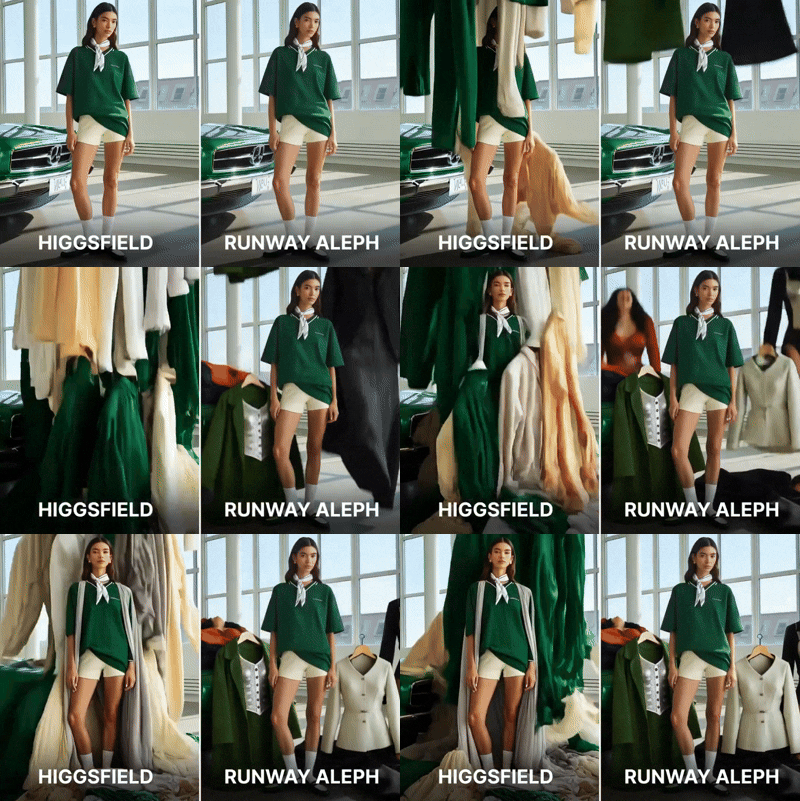
Here are some examples of the inconsistencies I encountered during testing:
How Higgsfield Compares
Here’s how Higgsfield stacks up against other popular AI video tools:
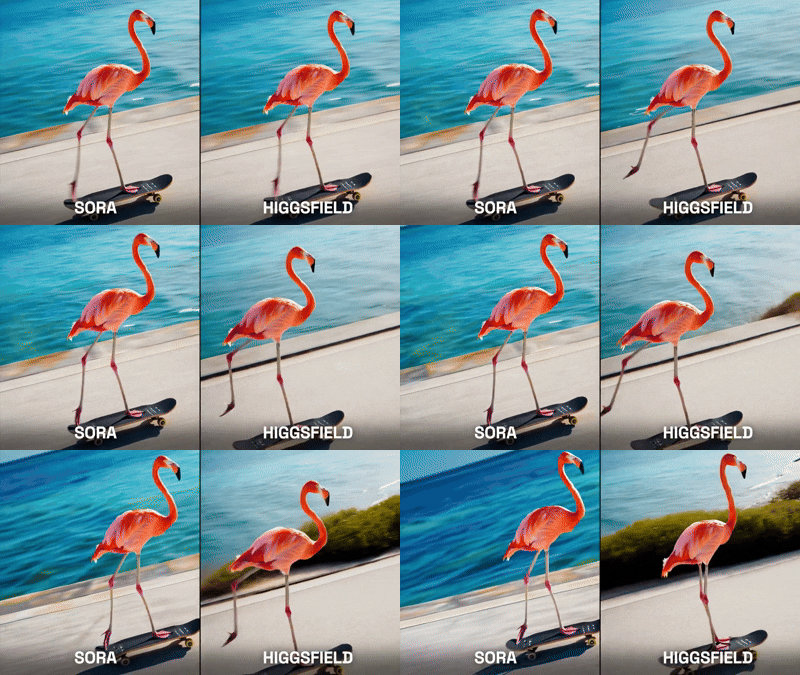
Against the current competition:
| Feature | Higgsfield AI | Kling AI | Runway Gen-3 |
|---|---|---|---|
| Video Quality | Excellent | Great | Good |
| Speed | Fast | Medium | Slow |
| Character Consistency | Strong | Moderate | Weak |
| Free Plan | Yes | Limited | No |
| Pricing | Moderate | Budget | Expensive |
Who Should Use Higgsfield AI?
Best for:
- Content creators who need cinematic-quality AI video
- Marketers creating ad variations at scale (pair it with Arcads AI for UGC-style ads)
- Anyone building character-driven video series
Skip if:
- You only need basic text-to-video occasionally
- You’re on a very tight budget
- You need full control over every frame
Pricing
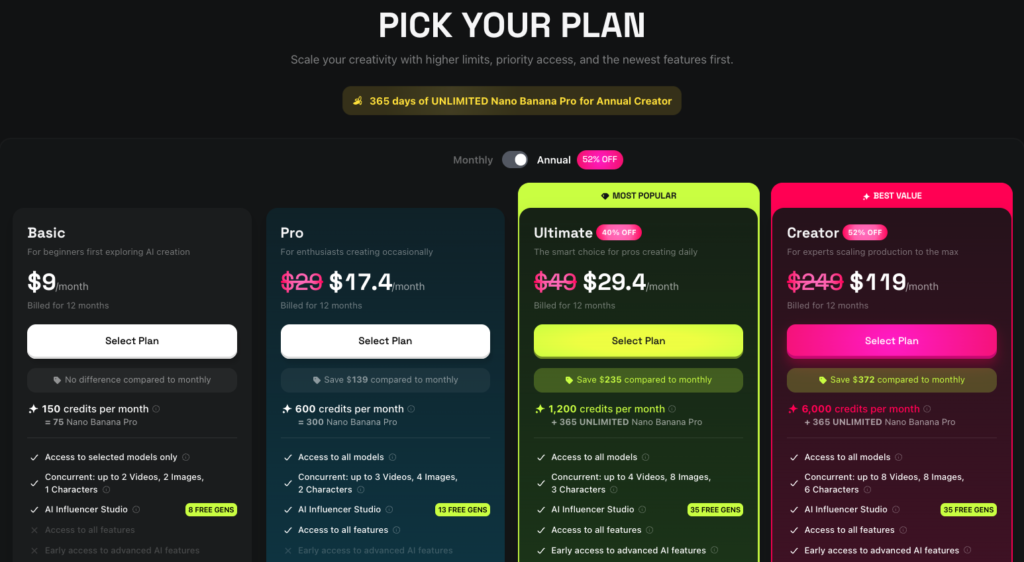
Higgsfield offers a free tier to test the platform. Paid plans start at a moderate price point and scale based on credit usage. The exact pricing changes frequently, so check their site for current rates.
The value proposition makes sense if you’re creating content regularly. For occasional use, the free tier may be enough.
Frequently Asked Questions
Is Higgsfield AI good for professional use? Yes. The output quality is professional-grade. I’ve used it for client work, and the results were accepted without any issues. The main limitation is credit consumption for high-volume production.
How does Higgsfield compare to competitors? It leads in video quality and character consistency. It’s faster than most alternatives. The main trade-off is cost — credits run out quickly for heavy users.
Can I use Higgsfield AI for commercial projects? Check their Terms of Service carefully. They do allow commercial use, but there are specific clauses about content rights that you should understand before using output in paid campaigns.
Is the free plan enough to evaluate the tool? Yes. The free credits give you enough to generate several videos and judge the quality for yourself. You’ll know within a few generations whether this tool is right for your needs.
What’s the learning curve like? Minimal. The interface is straightforward. Write a prompt, hit generate. The real skill is in prompt writing — being specific about what you want dramatically improves results. If you want structured training on Higgsfield and other AI video tools, check out our AI Video Bootcamp review.
📊 Full Pros & Cons Breakdown
👍 What We Liked
- Cinematic quality video output that rivals $5K cameras
- Fast rendering — most videos under 2 minutes
- Character consistency across multiple shots
- Free plan available to test before paying
- Active development with regular model updates
👎 What Could Be Better
- Concerning clauses in their Terms of Service
- Credits run out faster than you'd expect
- Paid plans can get expensive for heavy users
- Limited fine-grained control over motion details
- Occasional inconsistencies in complex scenes
🎯 Ready to try it yourself?
Try Higgsfield Free →⚡ We may earn a commission at no extra cost to you. Learn more
Was this review helpful? 🤔
Your feedback helps us write better reviews.
Thanks for your feedback! 🎉
Related Reviews
AI Video Bootcamp Skool Review: I Spent 3 Months Inside — Here's the Truth (2026)
A solid Skool community for video creators learning AI tools — great value at $9/month if you're actively learning, but not for passive members.
Arcads AI Review: Is This Worth Your Money in 2026?
AI UGC ad creator that generates realistic spokesperson videos at scale. Expensive at $110/month, but it can replace human UGC creators.
Get Honest AI Tool Reviews
Join smart marketers who get our weekly breakdown of what's worth buying — and what's not. Zero fluff.
🔒 No spam, ever. Unsubscribe in one click.