How to Cancel ClickFunnels AI: 81 Help Articles, No Cancel Steps
- Cancel anytime
- Credits are non-refundable
- Funnels stay live on Free
ClickFunnels AI lists no cancel steps in its 81 help articles. Start in workspace Billing. Access runs to period end. Credits are non-refundable. Read Nov 22.

ClickFunnels AI publishes no step-by-step cancel instructions as of November 22, 2026. Its help center holds 81 articles, and none of them names a cancel button or the menu it sits in. The vendor gives two pointers: “Check it in your workspace billing settings” and “Check your renewal date in Account → Billing.” Billing is where the plan lives, so start there.
The vendor does publish what happens next. Renewals stop, the plan runs to the end of the period you paid for, and the workspace returns to Free. Credits are non-refundable.
I have a Free workspace and built one test funnel in it on November 21, 2026. Its navigation has a Billing entry and a Help tickets entry. I have not held a paid plan, so I have not seen the cancel control myself, and I will not guess its label.
Disclosure: ClickFunnels AI pays us nothing. We earn a commission if you join MarketingSecrets.AI through our link.
How do you cancel ClickFunnels AI?
Cancelling ClickFunnels AI starts in the Billing area of the workspace that holds the plan. The vendor’s guidance stops there. This table separates what its pages state from what they leave out.
| Question | What ClickFunnels AI publishes | Status |
|---|---|---|
| Where the plan lives | ”Check it in your workspace billing settings.” | Published |
| Where the renewal date shows | ”Account → Billing” | Published |
| Cancel button label and location | Nothing | Not published |
| Which workspace role can cancel | Nothing | Not published |
| How to reach a person | A help ticket, opened after sign-in | Published |
| How to delete the account | ”You may terminate your account at any time.” No button, form or email is named | Method not published |
Sources: the help center, clickfunnels.ai/pricing and the terms.
With that much published, the working route is short:
- Sign in to the workspace that holds the paid plan.
- Open Billing and write down the renewal date.
- Find the plan controls on that page and cancel there.
- If you cannot find a cancel control, open a ticket. The Help panel has a Tickets tab: “open a ticket here and we will email you when someone picks it up.”
Send the ticket days before the renewal date. The help center says “Our team replies fast” and gives no number of hours.
On the Free plan there is no bill to cancel. It costs $0 and takes no card, as Is ClickFunnels AI free? explains.
What happens after you cancel ClickFunnels AI?
A cancelled ClickFunnels AI plan keeps running until the end of the period you already paid for. The workspace then moves to the Free plan, which gives 500 credits a month. The vendor describes the outcome in three lines.
- Access continues to period end. “If you cancel your plan yourself, it runs to the end of the period you already paid for and then your workspace moves to Free. No payment is attempted.”
- Funnels stay online. “Your funnels stay published on their default non-custom domain.”
- Custom domains drop off. “Custom domains are part of paid plans, so they are disconnected when your plan ends.”
One gap matters here. The vendor says unused plan credits expire when a plan ends through a failed payment. It does not say the same for a plan you cancel yourself, so spend those credits before the period closes. Credit packs follow a different rule: “Credit packs never expire and they carry over month to month.”
Does ClickFunnels AI refund a cancelled plan?
ClickFunnels AI does not refund credits, and I found no money-back guarantee on its pricing page, terms or help articles. Cancelling stops the next charge, and the last charge stays with the vendor.
| Money you paid | Published rule | Source |
|---|---|---|
| Credits you bought | ”non-refundable and non-redeemable for cash or any other value”, unless the law requires a refund | Terms, section 6 |
| Credits already used | ”Consumed credits aren’t refunded”, including when the output was imperfect | Pricing page; terms, section 7 |
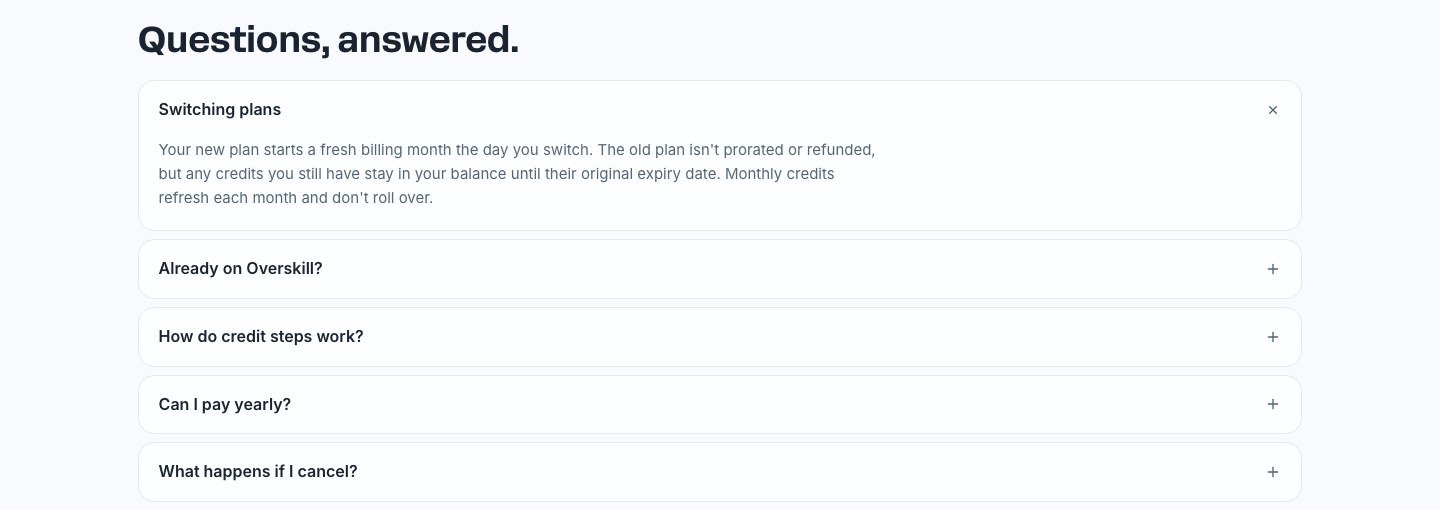
| The old plan after a switch | ”isn’t prorated or refunded” | Pricing FAQ |
| Fees other than credits | ”handled according to our refund policy”. I found no refund policy page | Terms, section 6 |
| An annual plan cancelled mid-year | Not published | None |
The annual row is the costly one. Yearly billing “is paid for the whole year at once”, for example $250 for Starter, and no page says what comes back if you leave in month three. Ask in a ticket before you rely on a refund. Plan prices are in my ClickFunnels AI pricing guide, and the promo code guide covers the yearly discount.
Cancel, downgrade, unpublish or delete: which one do you need?
Cancelling a ClickFunnels AI plan stops billing and keeps the account. Three other actions sit close to it.
| Action | What it does | How, per the vendor |
|---|---|---|
| Cancel the plan | Stops renewals. Workspace goes to Free at period end | Steps not published. Start in Billing |
| Switch to a smaller plan | ”Your new plan starts a fresh billing month the day you switch.” Existing domains stay live | Steps not published |
| Unpublish a funnel | Takes one funnel offline. “Your pages, every version, your funnel’s data and its address all stay." | "Unpublish at the bottom of Publish settings” |
| Delete the account | Your right to use the service ends, and “we may delete your data after a reasonable retention period” | Method not published |
For a deletion request, open a help ticket. The terms also list a legal contact, legal@overskill.com, because ClickFunnels AI is operated by Overskill, LLC.
Two neighbouring bills are separate. The pricing FAQ says an Overskill plan is separate and “changing one never affects the other” (see my Overskill review). A ClickFunnels 2.0 subscription is a different product too, as ClickFunnels AI vs ClickFunnels 2.0 explains. Its cancel and pause rules are in my ClickFunnels pricing guide.
Before you cancel: 6 checks
- Note the renewal date in Account → Billing. Access runs to that date, so cancelling early costs you nothing.
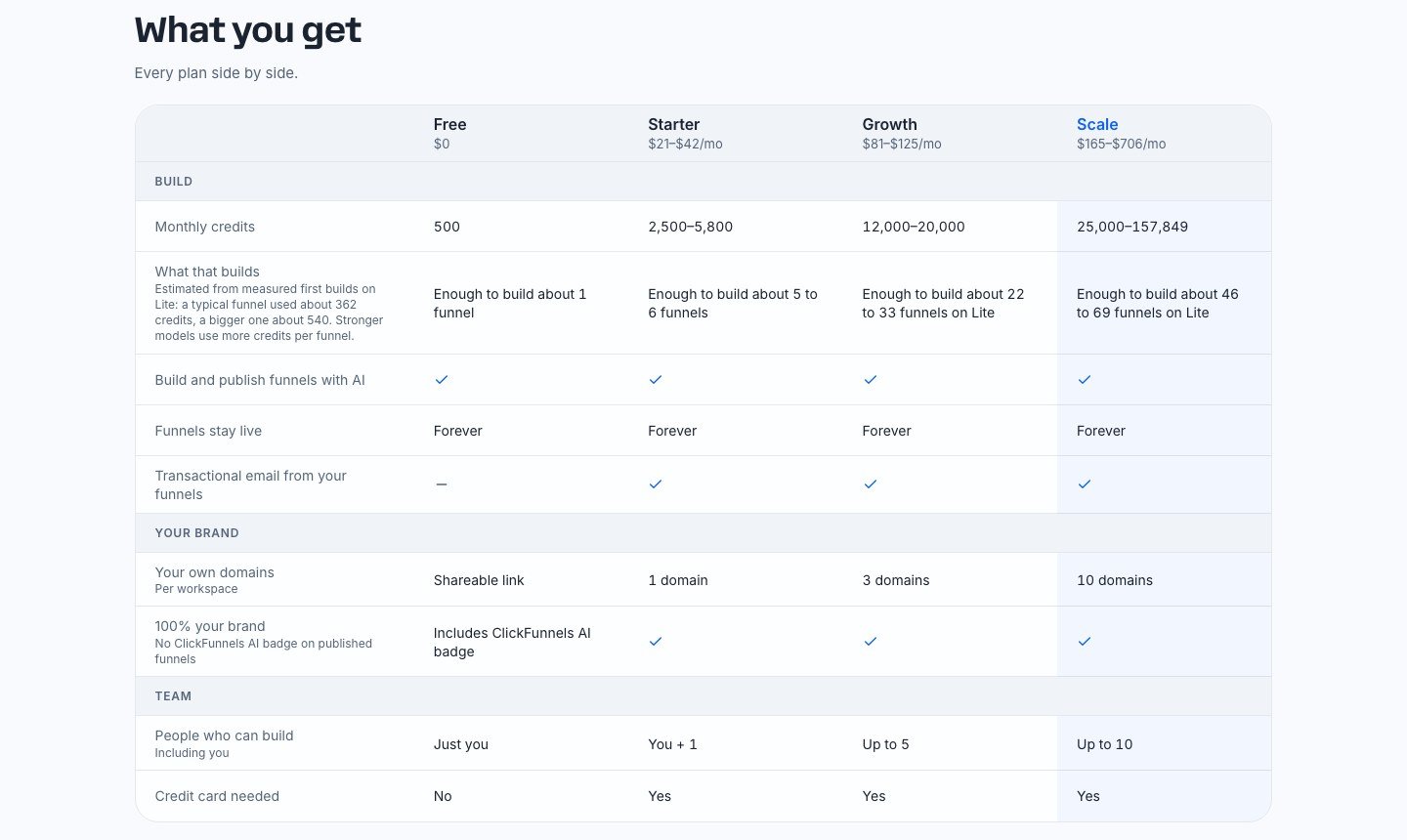
- Spend your plan credits. A full funnel uses about 360 credits, per the pricing page. My own 3-page build used 388, as the ClickFunnels AI review shows.
- Switch off automatic refills in Billing. Pay as you go adds “a credit pack of 5,000 credits for $49.50”, and I found no line that says a cancelled plan stops it.
- Move your custom domains. They disconnect when the plan ends, so repoint live ads and emails first.
- Export your data. Table exports run “up to 50,000 rows” and are “free on every plan”.
- Export the build. Use “Publish → Advanced Features → Export ZIP”. The link is “valid for 24 hours” and leaves out secrets and user uploads.
Already exported and done with funnel builders? This link opens MarketingSecrets.AI, a different product from ClickFunnels AI.
Try MarketingSecrets.AI Free →
Leaving because you want more than a funnel builder?
ClickFunnels AI builds funnel pages and emails from a prompt. If you are cancelling because you also need research, content and task automation, the same founders sell a second product: MarketingSecrets.AI.
I have not tested MarketingSecrets.AI for this guide. Everything below is what its own pages say, read on November 22, 2026.
- Its headline is “Your AI Chief of Staff for marketing”. The page says it helps you “research your audience, draft marketing content, organize your business knowledge, and automate recurring tasks in one workspace.”
- The sales page names apps called Dream 100 and Funnel Oracle.
- The price is “Free for 14 days then $97.00 / month”, and the checkout shows a payment method field.
Read the limits before you sign up. No MarketingSecrets.AI page says it includes a page-building funnel editor, and none mentions ClickFunnels AI access. Its exit rules are strict. The marketingsecrets.com terms ask for a cancellation email to support@marketingsecrets.com “at least 24 hours before your free trial period ends”, and the marketingsecrets.ai terms say “ALL SALES ARE FINAL. NO REFUNDS.” Set a reminder for day 12.
The button below opens MarketingSecrets.AI, a different product from ClickFunnels AI.
Try MarketingSecrets.AI Free →
The site’s earlier MarketingSecrets.AI review covers the product in more depth.
ClickFunnels AI Cancellation FAQ
How do I cancel ClickFunnels AI?
Sign in, open Billing in the workspace that holds the plan, and cancel from the plan controls there. ClickFunnels AI does not publish the button label or exact steps in any of its 81 help articles, read November 22, 2026. If you cannot find the control, open a help ticket.
Will I get money back if I cancel my ClickFunnels AI subscription?
No refund is published for a cancelled plan. The terms say purchased credits are non-refundable unless the law requires a refund. The plan keeps running to the end of the period you paid for.
Do my funnels go offline when I cancel ClickFunnels AI?
No. The pricing page says your funnels stay published on their default non-custom domain. Custom domains disconnect when the paid plan ends.
Can I cancel a ClickFunnels AI annual plan and get a partial refund?
The vendor does not publish a rule for this. Annual plans are paid for the whole year at once, and no help article or terms line covers a mid-year cancel. Ask in a help ticket first.
How do I delete my ClickFunnels AI account?
The terms say you may terminate your account at any time, but no help article names a delete button, form or email. Open a help ticket and ask for deletion. Export your tables and your build first.
Does cancelling ClickFunnels AI cancel ClickFunnels 2.0 or Overskill?
No. ClickFunnels 2.0 is a separate product with its own subscription and support team. The pricing FAQ says an Overskill plan is separate and that changing one never affects the other.
Related Reading
Try it yourself
Ready to put it to the test?
We may earn a commission at no extra cost to you. Affiliate disclosure.
Opens MarketingSecrets.AI, a different product. Free for 14 days, then $97/month. Read Nov 22, 2026.
Reader feedback
Was this review helpful?
Your feedback helps us write better reviews.
Thanks for your feedback.

AI Funnel Insider is an independent review site covering AI tools, Skool communities, and online courses. Every review states what was paid for, what was accessed and what was verified before a verdict goes live. Reviews are independent and may contain affiliate links, at no extra cost to you.
Related Posts

ClickFunnels AI Sign Up: 3 Methods, No Card, 500 Credits
ClickFunnels AI sign up takes Google, Apple or an emailed 6-digit code. No card, 500 credits a month. My first build used 388. Checked Nov 22, 2026.

ClickFunnels AI Pricing: 4 Plans, $0 to $847 a Month
ClickFunnels AI costs $0 for 500 credits a month, then $25 to $847 a month by credit step. Annual billing gives 2 months free. Prices read Nov 21, 2026.

ClickFunnels AI Review (Russell Brunson): 388 Credits, 1 Funnel
We built one funnel on ClickFunnels AI, from Russell Brunson's company: 6 minutes, 388 of 500 free credits, emails not connected. Tested Nov 21, 2026.

ClickFunnels AI vs ClickFunnels 2.0: $0 Start vs $97 a Month
ClickFunnels AI builds a funnel from a prompt and starts at $0. ClickFunnels 2.0 adds courses and CRM from $97 a month. Price table and who should pick each.

ClickFunnels AI Black Friday 2026 → Deal Status + Prices
No ClickFunnels AI Black Friday deal yet, checked Nov 22, 2026. Annual billing gives 2 months free: Starter $21 a month vs $25. All 4 plan prices inside.

ClickFunnels AI Promo Code: No Code, but 2 Months Free Yearly
No ClickFunnels AI promo code was visible on Nov 21, 2026. Annual billing gives 2 months free, a saving of $50 to $300 a year, and the Free plan costs $0.
The Insider Newsletter
Funnel software price drops and trial changes.
One email when a funnel or course platform changes its pricing or trial, plus our Sunday review.