ClickFunnels AI Review (Russell Brunson): 388 Credits, 1 Funnel
Access Tested We used the product hands-on but did not buy it at retail for this review.- 1 funnel built, Free plan
- 388 credits, about 6 minutes
- Not published, no payment taken
We built one funnel on ClickFunnels AI, from Russell Brunson's company: 6 minutes, 388 of 500 free credits, emails not connected. Tested Nov 21, 2026.

One answer produced 3 pages, 5 written emails and the lead magnet itself in about 6 minutes
The build used 388 of the 500 free monthly credits, which leaves less than one AI edit
- Review type
- Access Tested. We used the product hands-on but did not buy it at retail for this review.
- Tested since
- One Free plan funnel built 21 November 2026
- Last verified
- 2026-11-21
- Evidence reviewed
- /images/posts/clickfunnels-ai-review/cfai-editor-built-funnel-nov21.jpg · /images/posts/clickfunnels-ai-review/cfai-built-optin-page-nov21.jpg · /images/posts/clickfunnels-ai-review/cfai-built-download-page-nov21.jpg
- Affiliate relationship
- Yes, disclosed above
| Closest alternatives | Price | Score |
|---|---|---|
| Kartra | $59-$549/mo | 4.2/5 |
| ClickFunnels 2.0 | $97/month | 4.2/5 |
| Systeme.io | Free-$97/month | 4.1/5 |
ClickFunnels AI turned one typed answer into a 3-page lead funnel with 5 written emails in about 6 minutes on the Free plan, and the draft was good enough to edit instead of restart. It is a fast first-draft tool with unfinished parts: the emails connect to no sender, the opt-in page carried quotes the AI invented, and the build used 388 of the 500 free monthly credits.
We ran this test on 21 November 2026 in a signed-in Free workspace. ClickFunnels AI is the prompt-to-funnel product from ClickFunnels, the company Russell Brunson and Todd Dickerson founded in 2014.
Disclosure: the ClickFunnels AI links on this page are referral links that record sign-ups. ClickFunnels AI pays no commission on its plans as of 21 November 2026, and this site may earn one if that changes.
What we tested, and what we did not
This review rests on one build.
| We did | We did not |
|---|---|
| Build one funnel from the “Free guide + nurture emails” formula | Publish the funnel |
| Use the Free plan, the Lite model and Smart thinking | Take a payment |
| Open every page and email the AI wrote | Connect a domain or an email tool |
| Read the workspace Billing, Plans and Integrations pages | Buy a paid plan or try the Max model |
So we can speak to the build and the draft. Checkout and email delivery are untested. Prices and plan rules come from the pricing and billing pages, read the same day.
The build, step by step
Step 1: pick a formula
Clicking the prompt box on the home page opened a modal with three steps: Pick a formula, Try it, Build it. Its headline is “Start with a proven formula.” ClickFunnels says there that every formula is “modeled on what’s worked across $14 billion+ in payments processed through ClickFunnels”. That is the vendor’s claim, and we have no way to check it. The same modal labels its cards “Illustrative preview, sample content, not live results.”
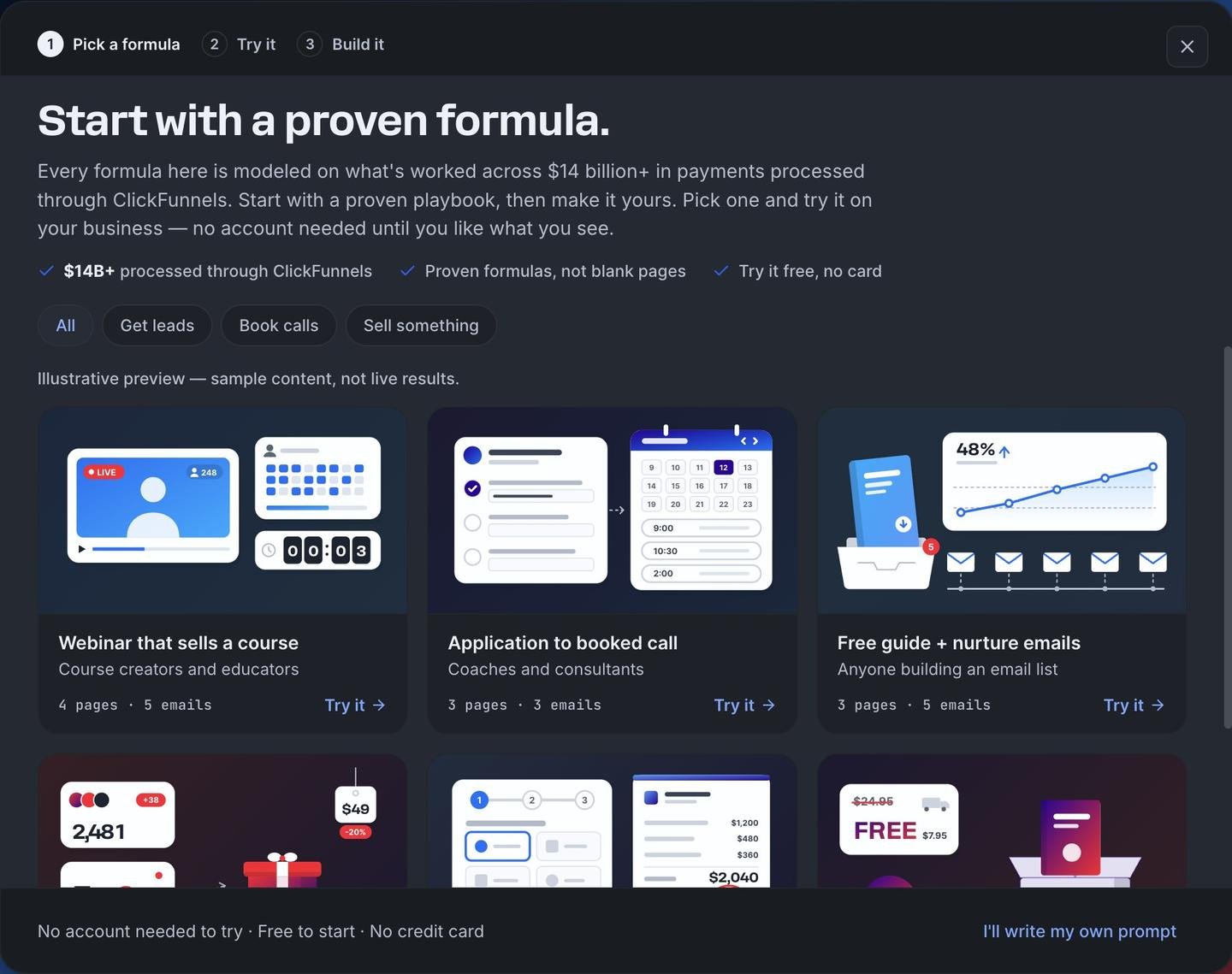
| Formula | Built for | Pages | Emails |
|---|---|---|---|
| Webinar that sells a course | Course creators and educators | 4 | 5 |
| Application to booked call | Coaches and consultants | 3 | 3 |
| Free guide + nurture emails | Anyone building an email list | 3 | 5 |
| Product launch waitlist | Physical products and brands | 4 | 4 |
| Service quote request | Contractors, studios and agencies | 3 | 2 |
| Free + shipping book | Authors and experts | 4 | 3 |
An “I’ll write my own prompt” link skips the formulas. We did not use it.
Step 2: answer one question
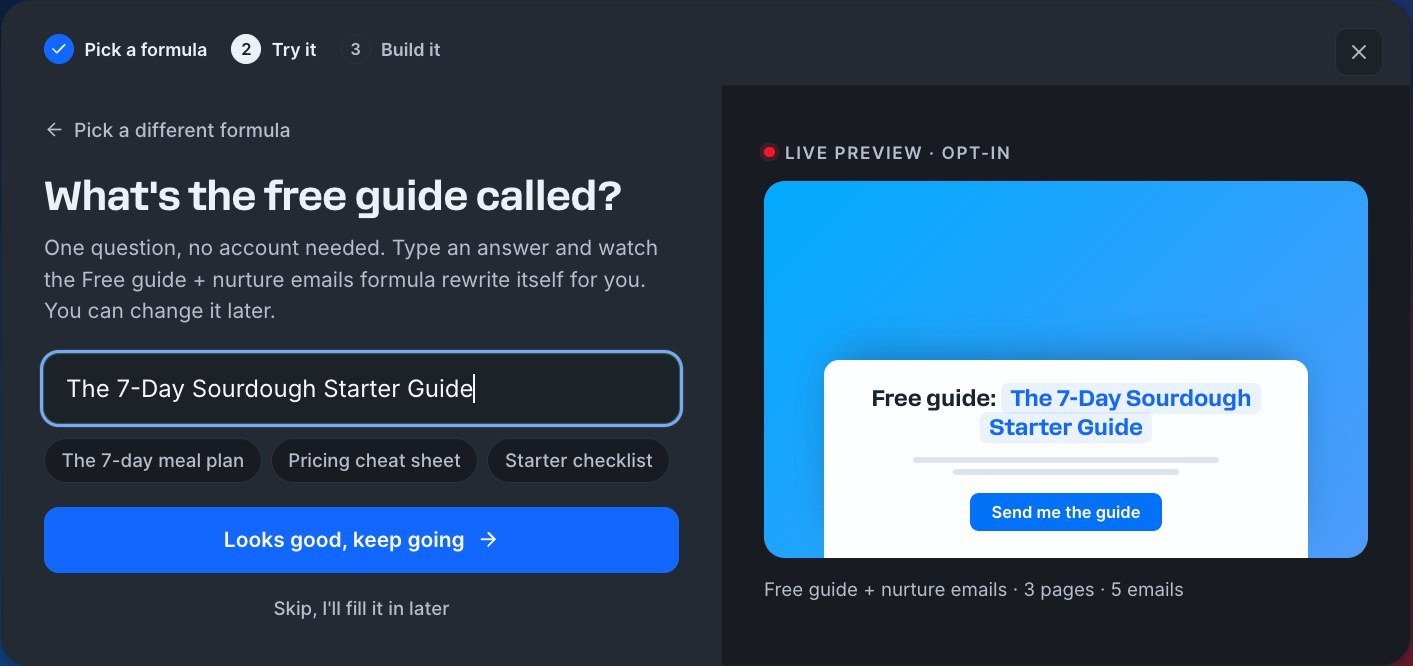
We picked Free guide + nurture emails. Step 2 asked a single question: “What’s the free guide called?” We typed “The 7-Day Sourdough Starter Guide”, and a live preview of the opt-in headline changed as we typed. It asked for nothing else.
Step 3: the build
The build did not start from a blank page. It cloned a stock template, a pricing ebook funnel for a fictional firm called “Marin & Co.”, and the AI rewrote it for sourdough.
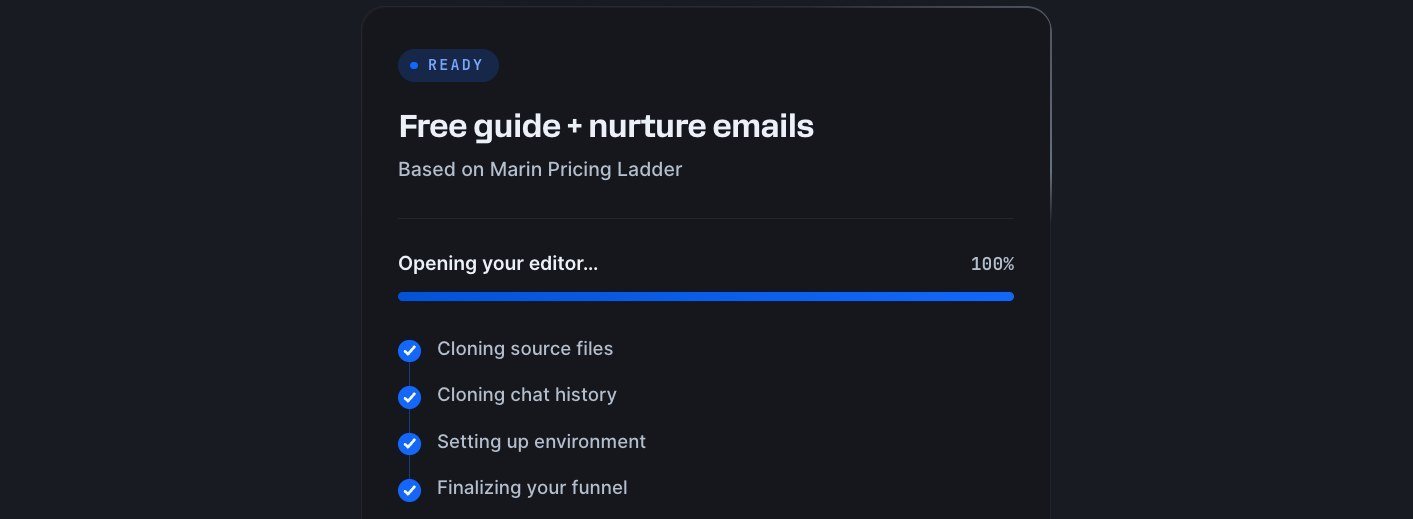
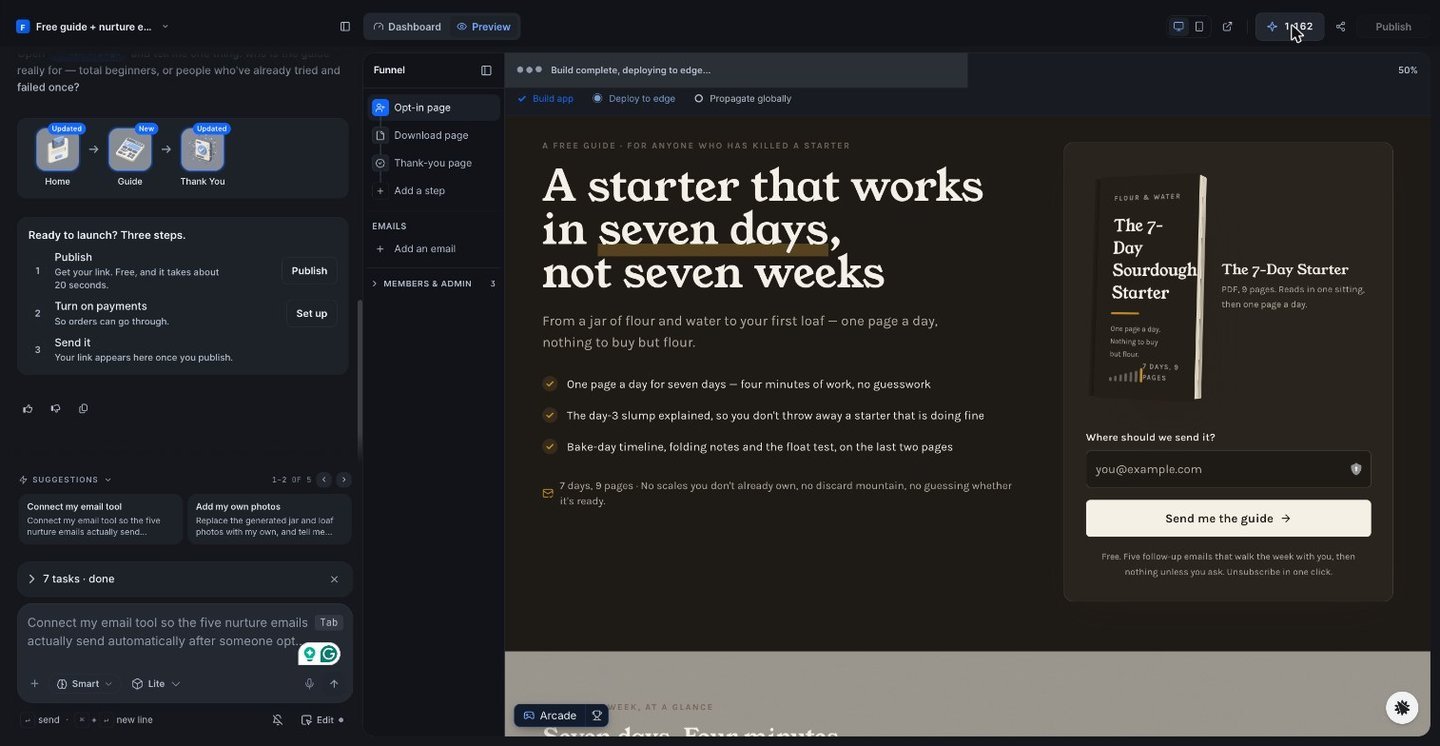
The task list showed 7 jobs: set the look and fonts, build the opt-in page, add the guide download page, build the thank-you page, write the five nurture emails, create funnel photography, and update the funnel notes and project brief. About 6 minutes passed between our click and “7 tasks, done”. We watched the clock and used no stopwatch.
What came out of one answer
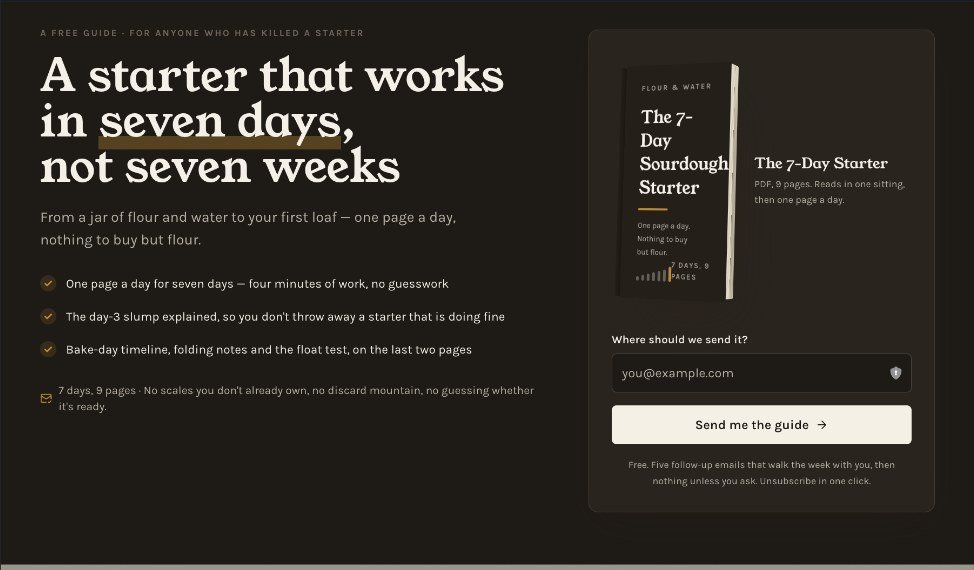
The AI invented a whole brand, “Flour & Water Sourdough”, and carried it across every page.
- Opt-in page. The headline reads “A starter that works in seven days, not seven weeks”. Under it sit 3 benefit bullets, a generated ebook cover, an email field and a “Send me the guide” button.
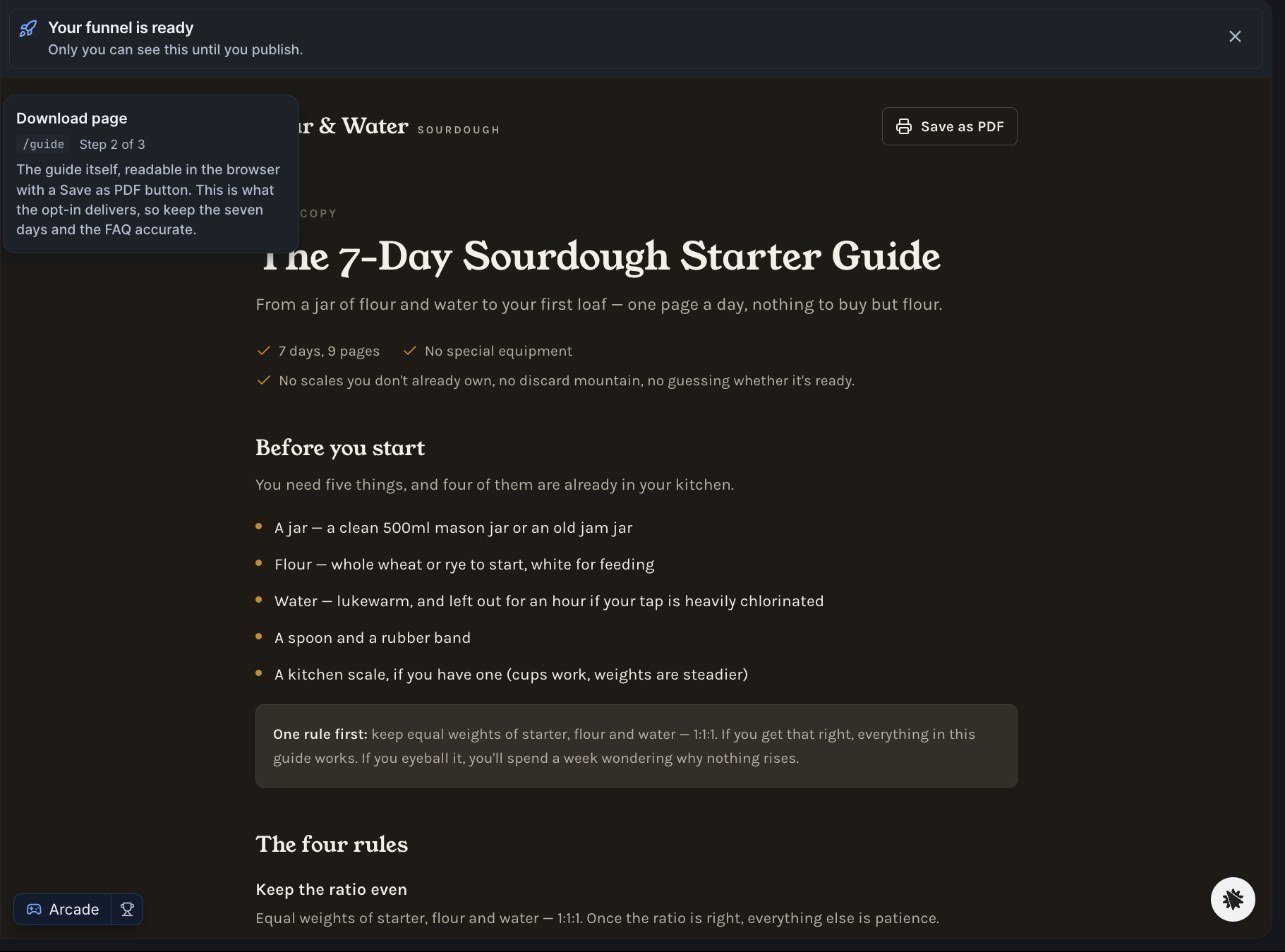
- Download page. The guide itself, written out in the browser with a “Save as PDF” button. The AI counts it at about 9 pages.
- Thank-you page. It opens “You’re in. Start with day one tonight.” and previews the email schedule.
- Five nurture emails, each with send timing.
- Two AI-generated photos: a starter jar and a loaf.
What was good
It wrote the lead magnet. The AI wrote the guide itself, with a “Before you start” list, four rules and day-by-day pages.
One question was enough. A guide title produced a matching brand, headline, bullets and email sequence.
It reported its own gaps. Without being asked, the AI told us the emails were not connected and that the quotes on the opt-in page were invented. It told us to swap the quotes, set a real contact email and replace the two photos before sharing.
The next steps are short. A launch card lists three: Publish (“Free, and it takes about 20 seconds”), Turn on payments, and Send it. We did not run them.
What was weak or unfinished
The emails do not send. The AI’s own words: “The emails do not send yet, nothing here is connected to an email service.” They sit on a page only the owner can open, ready to paste into an email tool, and the editor showed an “Integration not verified” notice. The Integrations page lists “1,827 Available”, of which “1,032 ready to connect”. We connected none.
The sample quotes are invented. The AI said so: “The quotes on the opt-in page are samples I invented.” Publish without replacing them and you show fake testimonials to real visitors.
One build ate most of the free month. The billing page read “388 used this month of 500 plan allowance”, “across 24 transactions”. That leaves 112 of the allowance (calculated), and the pricing page prices one AI edit at about 260 credits. Our credit counter fell from 1,550 to 1,162 during the build. The balance sat above 500 before we started and the billing page does not say why, so we measure against the 500 plan allowance.
Credits burn on misses, with no refunds. The pricing page says credits pay for AI work, including failed or imperfect generations, and consumed credits are not refunded.
The stronger model is locked. The model menu offers Lite (“Lowest cost”) and Max (“Standard cost”). Max sits behind Upgrade, and the menu says “Free builds use Lite.”
Two headline features are not open. Optimize, which tests AI-written page variants on real visitors, and Audiences were both labelled “Coming soon”.
It starts from a stock template. We built once, so we cannot tell how alike two funnels from the same formula look.
How we score it: 4.3 out of 5
The rating covers the free build only.
| Area | Score | Why it is not 5 |
|---|---|---|
| Ease of Use | 4.8 | One question and 6 minutes. A small deduction because the single question gave us no say over brand or audience before credits were spent |
| Output Quality | 4.4 | Coherent pages and a real guide. Points off for invented quotes and AI photos you must replace |
| Value for Money | 4.1 | Free to try, but 388 credits a build, no rollover and no refunds on consumed credits |
| Completeness | 3.9 | Emails unconnected, Optimize and Audiences not open, Max locked on Free, and nothing after the draft verified by us |
The four scores average 4.3 (calculated). Publishing, payments and email delivery are outside it.
ClickFunnels AI pricing in short
| Plan | Monthly price | Credits a month | Custom domains |
|---|---|---|---|
| Free | $0, no card | 500 | Shareable link only |
| Starter | $25 to $50 | 2,500 to 5,800 | 1 |
| Growth | $97 to $150 | 12,000 to 20,000 | 3 |
| Scale | $197 to $847 | 25,000 to 157,849 | 10 |
Annual billing gives “2 months free”. At the first Starter step, our 388-credit build would cost $3.88 (calculated). Every step is in our ClickFunnels AI pricing guide, the $0 plan is covered in Is ClickFunnels AI free?, and we found no promo code.
Who it suits, and who should use ClickFunnels 2.0
Use ClickFunnels AI if you have an offer and no funnel, and you want a full draft to edit today. Plan for the cleanup: real quotes, your own photos and an email tool.
Use ClickFunnels 2.0 if the funnel is one part of a business that also needs courses and a CRM. It starts at $97 a month, has no free plan and comes with a 30-day money-back guarantee. Our ClickFunnels review covers that platform, and ClickFunnels AI vs ClickFunnels 2.0 puts the two side by side. A 2.0 account is not required for ClickFunnels AI.
Who runs ClickFunnels AI?
ClickFunnels AI carries the ClickFunnels brand. Its About page names Russell Brunson as Co-Founder and Chief Experience Officer and Todd Dickerson as Co-Founder and Chief Strategy Officer, and dates the company to 2014. The footer adds that ClickFunnels AI “is operated by Overskill, LLC”, with payments processed by Payments.AI. Overskill is the AI app builder covered in our Overskill review.
ClickFunnels AI Review FAQ
Is ClickFunnels AI worth trying?
Yes, on the Free plan. Our one test build produced 3 pages, 5 written emails and a full lead magnet in about 6 minutes with no credit card. Treat the result as a draft: the emails were not connected and the sample quotes were invented.
How long does ClickFunnels AI take to build a funnel?
About 6 minutes in our test on 21 November 2026, for a 3-page funnel with 5 emails on the Lite model. We watched the clock and did not use a stopwatch.
How many credits does one ClickFunnels AI funnel use?
Our build used 388 credits across 24 AI transactions. The pricing page puts a full funnel at about 360 credits, and the Free plan gives 500 a month.
Does ClickFunnels AI send the emails it writes?
Not in our build. The AI wrote five nurture emails and reported that they do not send until you connect an email service. We did not connect one.
Who owns ClickFunnels AI?
ClickFunnels, the company founded in 2014 by Russell Brunson and Todd Dickerson. The site footer says ClickFunnels AI is operated by Overskill, LLC, and payments are processed by Payments.AI.
Do I need ClickFunnels 2.0 to use ClickFunnels AI?
No. ClickFunnels AI is a separate product with its own plans, including a Free plan with 500 credits a month. ClickFunnels 2.0 starts at $97 a month and has no free plan.
Related Reading
- ClickFunnels AI Pricing
- Is ClickFunnels AI Free?
- ClickFunnels AI Promo Code
- ClickFunnels AI vs ClickFunnels 2.0
- ClickFunnels Review
- Overskill Pricing and Review
- ClickFunnels AI Sign Up
- How to Cancel ClickFunnels AI
- ClickFunnels AI vs GoHighLevel
- ClickFunnels AI vs MarketingSecrets.AI
- ClickFunnels AI Black Friday
Full pros & cons
- One answer produced 3 pages, 5 written emails and the lead magnet itself in about 6 minutes
- No credit card on the Free plan, and the formula picker works before you make an account
- The AI reported its own gaps: unconnected emails and invented sample quotes
- Lite model and Smart thinking, the free defaults, gave a draft we would edit and keep
- The build used 388 of the 500 free monthly credits, which leaves less than one AI edit
- The 5 emails were not connected to any email service
- The opt-in page shipped with quotes the AI invented
- Max model is locked on Free, and Optimize and Audiences were labelled Coming soon
- Credits pay for failed generations too, and consumed credits are not refunded
Try it yourself
Ready to put it to the test?
We may earn a commission at no extra cost to you. Affiliate disclosure.
Free plan: 500 credits a month, no card. Paid from $25/month. Credits non-refundable. Read Nov 21, 2026.
Reader feedback
Was this review helpful?
Your feedback helps us write better reviews.
Thanks for your feedback.

AI Funnel Insider is an independent review site covering AI tools, Skool communities, and online courses. Every review states what was paid for, what was accessed and what was verified before a verdict goes live. Reviews are independent and may contain affiliate links, at no extra cost to you.
Related Posts

Overskill Pricing 2026: $25 Starter, $99 Studio, 500 Free Credits
Overskill pricing now starts at $25/mo Starter, with $99 Studio. Real credit costs, the 500 free starting credits and the certification price, 31 Oct 2026.

ClickFunnels AI Sign Up: 3 Methods, No Card, 500 Credits
ClickFunnels AI sign up takes Google, Apple or an emailed 6-digit code. No card, 500 credits a month. My first build used 388. Checked Nov 22, 2026.

ClickFunnels AI vs Marketing Secrets AI: 2 Products, $0 vs $97
ClickFunnels AI and MarketingSecrets.AI are 2 separate products. One builds funnels from $0. The other is a $97 a month AI workspace. Checked Nov 22, 2026.

How to Cancel ClickFunnels AI: 81 Help Articles, No Cancel Steps
ClickFunnels AI lists no cancel steps in its 81 help articles. Start in workspace Billing. Access runs to period end. Credits are non-refundable. Read Nov 22.

ClickFunnels AI Pricing: 4 Plans, $0 to $847 a Month
ClickFunnels AI costs $0 for 500 credits a month, then $25 to $847 a month by credit step. Annual billing gives 2 months free. Prices read Nov 21, 2026.

ClickFunnels AI vs ClickFunnels 2.0: $0 Start vs $97 a Month
ClickFunnels AI builds a funnel from a prompt and starts at $0. ClickFunnels 2.0 adds courses and CRM from $97 a month. Price table and who should pick each.
Price watch
Get told if ClickFunnels AI changes price.
It is Free plan, or from $25/month today. We re-check prices on everything we review and email you once when this one moves, plus the Sunday review.