Skool Pricing 2026: Real Cost After the 10% Fee
Skool's plans look simple until you add the transaction fees. The real monthly cost, the break-even point, and how it compares before you commit.

Quick Answer: What Does Skool Cost in 2026?
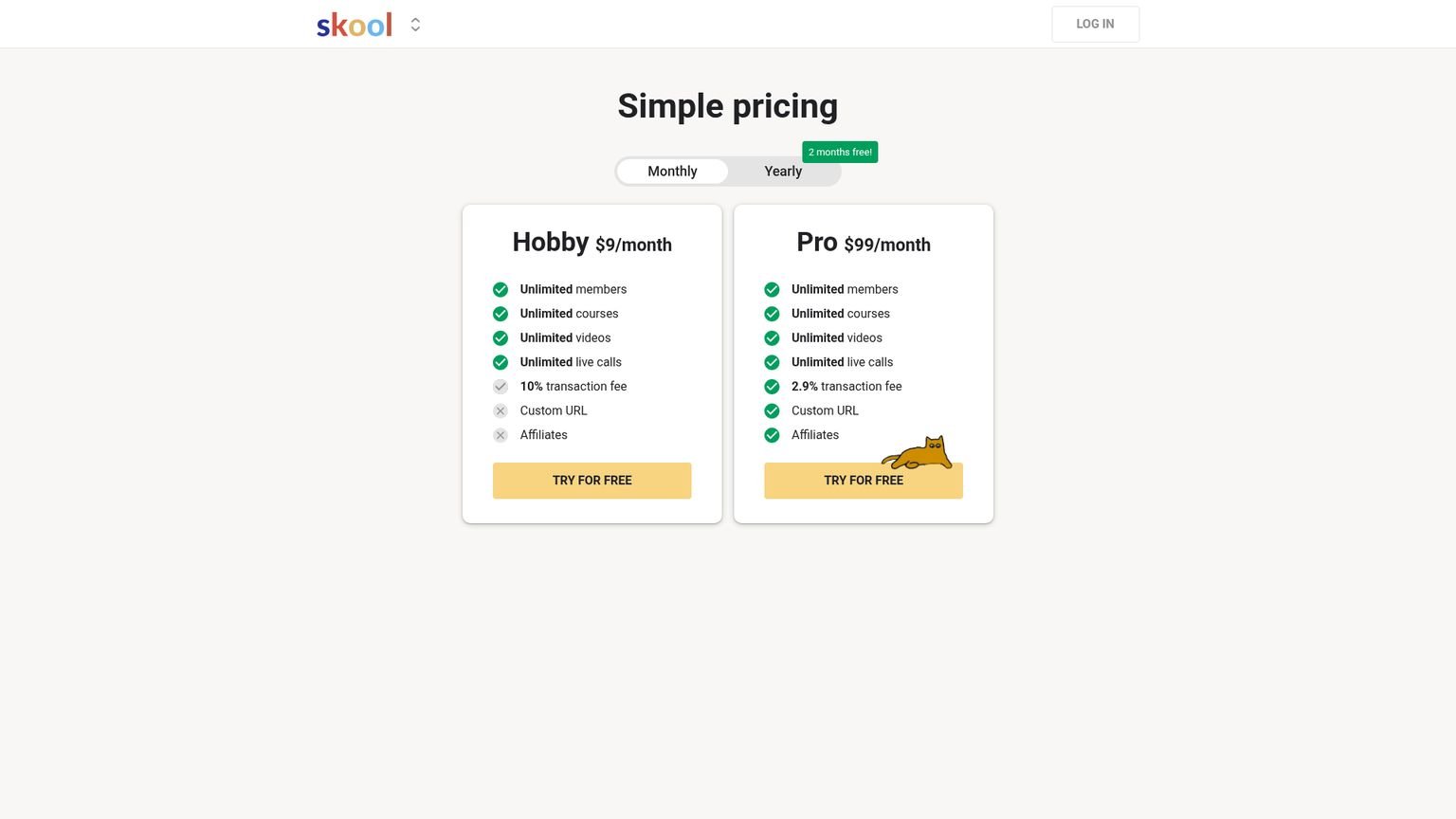
Skool has two plans. Hobby is $9/month with a 10% transaction fee on member payments. Pro is $99/month with a 2.9% fee plus $0.30 per payment. Both plans include unlimited members, courses, video hosting, and live calls, so the fee is the only thing that separates them (Skool pricing, verified August 2026).
TL;DR: Hobby costs $9/month and takes 10% of everything you collect. Pro costs $99/month and takes 2.9% plus $0.30 per payment. The two lines cross somewhere between $1,270 and $1,400 a month in community revenue, depending on what you charge per member. Under that, Hobby is cheaper. Over it, Pro pulls away fast: a community collecting $10,000/month keeps roughly $559 more each month on Pro.
Last updated: September 2026
Skool pricing used to be one line. One plan, $99/month, the same flat rate Sam Ovens launched with in 2019.
Then on July 8, 2025, Skool added a $9/month Hobby plan and the math got interesting. Two tiers, two fee structures, and a break-even point most creators guess wrong because they only read the sticker price.
Skool says it hosts well over 100,000 active communities as of mid-2026, and the Skool Games prize pool runs into six figures every month. Nobody is asking whether the platform is real. The question I get is narrower: which plan costs me less? I have run this calculation for half a dozen paid communities at different revenue levels, and the same mistake keeps showing up. People stay on Hobby because $9 feels safe, then hand over $500 a month in fees they never see on an invoice.
Let’s fix that.
How Much Does Skool Cost Per Month?
Skool costs $9/month on Hobby or $99/month on Pro, plus transaction fees on any money you collect from members. Annual billing knocks roughly 17% off both, which works out to about $7.50/mo and $82/mo, or two free months a year (Skool pricing, 2026).
Here are the two plans side by side.
| Feature | Hobby ($9/mo) | Pro ($99/mo) |
|---|---|---|
| Monthly price | $9 | $99 |
| Annual effective price | ~$7.50/mo | ~$82/mo |
| Transaction fee | 10% | 2.9% + $0.30 |
| Unlimited members | Yes | Yes |
| Unlimited courses | Yes | Yes |
| Unlimited video hosting | Yes | Yes |
| Unlimited live calls | Yes | Yes |
| Custom URL / domain | Yes | Yes |
| Affiliate program | Yes | Yes |
| Free 14-day trial | Yes | Yes |
Both tiers get unlimited members, unlimited courses, unlimited video, live calls, a custom URL, and an affiliate program. The fee is the split. Everything else is the same product.
The Hobby plan launched on July 8, 2025. Before that date every community paid $99/month and there was no cheaper door. The new tier gave creators a way to test an idea without three-figure overhead from week one.
One detail worth flagging: the custom URL and the affiliate program used to sit behind Pro. They ship with Hobby now, which removes two of the old reasons to upgrade early and leaves the fee doing all the work.
What Are Skool’s Transaction Fees?
Hobby takes 10% of every member payment. Pro takes 2.9% plus $0.30 per payment (Skool pricing, verified August 2026). Skool’s Payments documentation also lists a higher 3.9% rate on individual payments above $900, so check that before you price a high-ticket annual plan.
Run one example. You charge $49/month and you have 20 members, so you collect $980. On Hobby you pay $98 in fees plus the $9 subscription, which is $107 to Skool. On Pro you pay $28.42 in fees, $6.00 in per-payment charges, and the $99 subscription, which is $133.42. At that size Hobby wins by $26.42 a month.
The 10% Fee Is the Whole Story
Ten percent sounds harmless until you multiply it by real revenue.
Skool markets Hobby as the cheap plan, and at low volume it is. But 10% is roughly 3.5 times Pro’s 2.9%. Once your community clears about $1,300 a month, every additional dollar you collect on Hobby costs you more than it would on Pro. Most creators do not notice until they are thousands of dollars into the leak, because the fee never arrives as a bill. It just shortens the payout.
Stripe’s own card processing runs about 2.9% + $0.30. Hobby is charging you roughly a 7% platform override on top of that. Pro is close to pure processing cost.
Fee Cap on Large Transactions
Pro gets less friendly on high-ticket payments. Skool applies 3.9% + $0.30 on any single payment above $900, so a $1,500 annual membership or a $2,000 bundle gives back part of the margin you moved to Pro for. The Skool Payments FAQ carries the current schedule.
When Should You Upgrade From Hobby to Pro?
Upgrade when your community revenue crosses roughly $1,300 to $1,400 a month. That range is where Pro’s lower fee saves more than the $90 price gap. The exact crossover moves with your membership price, because Pro charges $0.30 per payment and 40 members at $49 means 40 of those charges while 10 members at $197 means 10.
The table below assumes $49/month memberships, the median price across paid Skool communities. Total cost is subscription plus all fees.
| Members at $49/mo | Monthly Revenue | Hobby Total | Pro Total | Winner |
|---|---|---|---|---|
| 10 | $490 | $58.00 | $116.21 | Hobby saves $58.21 |
| 20 | $980 | $107.00 | $133.42 | Hobby saves $26.42 |
| 28 | $1,372 | $146.20 | $147.19 | Dead heat |
| 40 | $1,960 | $205.00 | $167.84 | Pro saves $37.16 |
| 102 | $4,998 | $508.80 | $274.54 | Pro saves $234.26 |
| 204 | $9,996 | $1,008.60 | $450.08 | Pro saves $558.52 |
| 1,020 | $49,980 | $5,007.00 | $1,854.42 | Pro saves $3,152.58 |
A creator running a $50,000/month Skool community on Hobby is giving up around $37,800 a year. That is a full hire. I have watched people sit on that for months before anyone put the spreadsheet in front of them.
Calculate Your Own Break-Even in 10 Seconds
You do not need my table. You need the formula under it. The two plans cost the same when these lines meet:
9 + 0.10 × R = 99 + 0.029 × R + 0.30 × (R ÷ P)
R is your monthly community revenue and P is your membership price. Drop the per-payment term for a second and the answer is clean:
R = 90 ÷ 0.071 ≈ $1,268/month
That is the floor: the $90 price gap divided by the 7.1-point fee gap. Add Pro’s $0.30 per payment and the crossover slides up. At $197/month memberships it lands near $1,295. At $49/month memberships it lands near $1,390, because you are processing four times as many charges for the same revenue. So the honest answer is a band, roughly $1,270 to $1,400, and the cheaper your membership the higher your crossover sits.
Past the line, the 7.1-point gap compounds on every extra dollar. That is why the $50k community above loses five figures a year on the wrong plan.
Should Anyone Stay on Hobby Forever?
Yes, in three cases:
- You run a free community. No payments means no fees. Hobby at $9/month is the right answer and it stays the right answer.
- You’re validating an idea. While you are still finding out whether people will pay, Hobby caps your downside for the first 60-90 days.
- Your community stays small on purpose. Under about $1,000/month in revenue, Hobby is cheaper indefinitely. Plenty of good masterminds never want to be bigger than that.
Everyone else should switch the month the numbers say so.
Does Skool Offer a Free Trial?
Yes. Both Hobby and Pro come with a 14-day free trial and full feature access, and a credit card is required at signup (Skool, verified August 2026). Skool converts the account to your chosen paid plan on day 15 unless you cancel. Members who join a paid community you built get their own separate 7-day trial before the first charge.
Payments run through Stripe Express and Skool pays creators every Wednesday.
Cancel before day 14 and you pay nothing. Forget, and Skool bills the full month with no prorated refund for a missed cancellation. I set a calendar reminder for day 12. If you want the walkthrough, the Skool free trial guide covers the signup and cancellation steps in detail.
How Does Skool Pricing Compare to Competitors?
Skool’s $9/month Hobby plan undercuts every major community platform except Whop’s $0/month tier, and Skool Pro at $99/month sits below Kajabi Basic ($179/month, or $143 on annual), Circle Business ($199/month), and Mighty Networks Scale ($179/month) (Kajabi, Circle, Mighty Networks, verified August 2026).

Here is the field, with prices verified in August 2026.
| Platform | Entry Price | Mid Tier | Transaction Fee | Member Cap |
|---|---|---|---|---|
| Skool | $9/mo | $99/mo | 2.9-10% | Unlimited |
| Whop | $0/mo | n/a | 2.7% + $0.30 plus 3% platform | Unlimited |
| Circle | $89/mo (annual) | $199/mo | 2% Professional, 1% Business | 100 to unlimited |
| Kajabi | $143/mo (annual) | $199/mo | 0% (Stripe only) | 2,500 to unlimited |
| Mighty Networks | $79/mo | $179/mo | 2% Launch, 1% Scale | 100 to unlimited |
| Teachable | $29/mo | $69/mo | 0-7.5% | Unlimited |
| Podia | $33/mo | $75/mo | 0% | Unlimited |
Most comparison posts miss the trade underneath all of this. Platforms that advertise no transaction fee (Kajabi, Podia, pure Stripe setups) charge a much higher base subscription. Platforms with a low base (Skool Hobby, Whop) take it back on the way out. You are choosing between a fixed cost and a variable one, so pick based on where your revenue is heading, not on the number in the ad.
Whop advertises $0/month and then layers a 3% platform commission on top of Stripe, with another 1.5% on international cards. A $10k/month community pays roughly $600/month in blended fees there, close to double Skool Pro. The Whop vs Skool breakdown has the full fee math.
Skool vs the Big Three on Price
At $99/month, Skool Pro undercuts every major rival on base price. Kajabi Basic is $179/month, or $143 on annual billing, and caps you at 2,500 contacts and 3 products. Circle Professional is $89/month on annual billing with a 2% transaction fee, and the 1% rate only arrives at the $199 Business tier (my Circle.so pricing breakdown runs the full after-fee math). Mighty Networks Launch starts at $79/month with a 2% fee but limits the entry tier to 100 members (Kajabi, Circle, Mighty Networks, 2026).
Base price rarely decides this. Fee structure, member caps, and feature depth do. For the feature-level breakdowns, see Skool vs Kajabi, Skool vs Circle, and Skool vs Mighty Networks.
Is Skool Worth the Cost in 2026?
Skool is worth it if what you need is a community plus a simple course engine in one dashboard, and the $9 entry point makes that an easy test. An analysis of the top 1,000 paid Skool communities found the median membership charges $49/month and the average charges $376.77/month, so most creators cover the Pro subscription with their first one to three paying members (Skool Data by Zam Noor, 2025).
What both plans include:
- Community feed with threaded discussions and @mentions
- Unlimited course hosting with unlimited video upload
- Live event scheduling with a native calendar
- Gamification (points, levels, leaderboard) that drives daily logins
- Native iOS and Android apps with push notifications
- Payments via Stripe Express, with payouts every Wednesday
- Discovery feed visibility, which is free platform traffic
- Eligibility for Skool Games
What you do not get:
- Quizzes, certificates, or drip scheduling
- Native email marketing, so budget for Kit or similar
- A built-in CRM or sales pipeline
- Deep theming. Every Skool looks like a Skool.
The strongest argument for Skool over Kajabi or Circle has nothing to do with price. It is the discovery engine. New communities get surfaced to Skool’s existing user base, and that compounding organic distribution is not something you can buy on any Kajabi plan.
If quizzes, certificates, or email automation are dealbreakers, go to Kajabi or Teachable. If you care more about community velocity than feature depth, Skool is the obvious pick. My longer take lives in the full Skool review.
Skool Pricing Gotchas the Sales Page Skips
Three details worth knowing before you commit.
Each Community Needs Its Own Subscription
One subscription equals one community. Run a free community alongside a paid one, which is the standard list-building play, and you are paying twice. Three communities on Pro is $297/month, not $99. Plan the ecosystem with that in mind.
Cancellation Is Not Deletion
Canceling stops the billing but leaves the community standing. Members still see it. You just cannot collect new payments. Deleting it is a separate action buried in account settings.
Annual Billing Locks Your Rate
Skool has changed its pricing once, when Hobby arrived as a new tier rather than an increase, and has not signaled another change. Annual subscribers hold their rate until renewal either way. If you are confident you will still be on Skool in 12 months, annual is about 17% cheaper and doubles as insurance.
Skool Pricing for Members vs Creators
Two different questions hide inside “how much does Skool cost,” depending on which side of the community you are on.
As a creator, you pay Skool directly: $9/month on Hobby or $99/month on Pro, plus fees on whatever you collect.
As a member joining someone else’s community, you pay whatever the owner charges, usually $9 to $197/month, with high-ticket masterminds running past $500. You never pay Skool anything. Your payment moves through Skool’s Stripe integration to the creator, and Skool takes its cut on the creator’s side.
If you are deciding whether to join one specific paid community, the platform’s price list does not matter. The community’s own price and what it actually delivers do.
What Skool Pro Buys You Over Hobby
The Pro-only features read like small upgrades on the pricing page. In practice one of them carries almost all the value.
The Lower Fee Is 90% of the Argument
On $5,000/month of community revenue, dropping from 10% to 2.9% saves about $325 a month in fees alone. That is more than triple the $90 price jump. Treat every other Pro feature as a bonus.
Advanced Analytics
Pro gives you dashboards on member activity, course completion, revenue cohorts, and engagement over time. Hobby gives you counts. If you are setting prices or buying traffic, the gap matters.
Pixel Tracking
Pro lets you install Facebook and Google pixels on your community pages, which is what makes retargeting, conversion tracking, and lookalike audiences possible. Without it, paid acquisition into a Skool community is flying blind.
Pro Plugins
Skool-native integrations that only appear on Pro. The list changes over time and has included course drip, member tagging, and third-party email connections.
Who Each Plan Is For
Hobby ($9/month) fits:
- Creators validating an idea in the first 60-90 days
- Anyone running a free community with no paid tier
- Small paid communities that plan to stay under about $1,000/month
Pro ($99/month) fits:
- Any paid community over roughly $1,300/month
- Creators buying ads who need pixel tracking and real analytics
- Multi-tier memberships where the fee difference compounds
- Anyone past the validation stage and serious about the revenue
Frequently Asked Questions
Is there a free version of Skool?
No. There is no permanent free plan for creators. Pricing starts at $9/month on Hobby, and both plans include a 14-day free trial with full feature access and a card on file (Skool pricing, 2026). Members joining paid communities get a separate 7-day trial.
What is Skool’s transaction fee in 2026?
Hobby charges 10% of each member payment. Pro charges 2.9% + $0.30. On Pro, single payments above $900 move to 3.9% + $0.30 (Skool pricing, verified August 2026). Factor that surcharge in if you sell high-ticket annual memberships.
Can you actually make money on Skool?
Yes. Payments run through Stripe Express with weekly Wednesday payouts. An analysis of the top 1,000 paid communities found the average charges $376.77/month, and plenty of creators run six-figure communities on the platform (Zam Noor Skool Data, 2025). The Discovery feed and Skool Games also push newer communities in front of existing users.
Does Skool charge per member?
No. Both plans include unlimited members at a flat subscription price. Skool earns on the transaction fee, 10% on Hobby and 2.9% on Pro, not on head count. That matters at scale, because your per-member cost falls toward zero as the community grows. Contact-capped platforms like Kajabi, which limits Basic to 2,500 contacts, work the opposite way (Kajabi pricing, 2026).
Is Skool cheaper than Kajabi?
Yes. Skool starts at $9/month against Kajabi Basic at $179/month, or $143 on annual billing. Even Skool Pro at $99/month comes in under Kajabi’s cheapest plan, and Skool sets no limit on members or courses where Kajabi caps Basic at 2,500 contacts and 3 products (Kajabi pricing, verified August 2026). The Skool vs Kajabi comparison goes feature by feature.
What’s the break-even point between Hobby and Pro?
Roughly $1,300 to $1,400/month in community revenue, depending on your membership price. Below that band, Hobby’s $9 + 10% costs less. Above it, Pro’s $99 + 2.9% + $0.30 wins and the gap widens fast. At about $10,000/month, Pro saves around $559/month on $49 memberships.
Should I pick Skool Hobby or Skool Pro for a community that makes about $2,000 a month?
Pro. At $2,000 a month in member payments, Hobby’s 10% fee costs $200 on top of the $9 plan, about $209 in total. Pro costs $99 plus 2.9%, about $157 before the $0.30 per-payment charge. The break-even sits around $1,300 to $1,400 a month, so at $2,000 you are already past it, and the gap widens with every new member. Pro also adds pixel tracking and real analytics, which you need before buying ads. Both plans carry a 14-day free trial. Try Skool Pro free for 14 days
What is the cheapest platform for a coach launching a paid community this week with under $100 a month to spend?
Skool Hobby at $9 a month. It includes unlimited members, unlimited courses, video hosting, and live calls, and it takes 10% of each member payment instead of charging per seat. Circle starts at $89 a month before its email add-on, and Kajabi Basic starts at $179, so neither fits a sub-$100 budget with room to spare. Hobby suits the first 60 to 90 days while you validate the offer. Move to Pro at $99 once revenue passes about $1,300 a month. Both plans start with a 14-day free trial. Try Skool free for 14 days
Bottom Line on Skool Pricing
Start on Hobby at $9/month if you are validating an idea, running a free community, or sitting under $1,000/month. Move to Pro the month you cross $1,300, because that is where the 2.9% fee more than covers the $90 price jump.
Every month you stay on Hobby past that line, you are paying Skool money that should be in your account. A $10k/month community gives up about $6,700 a year on the wrong plan. A $50k community gives up nearly $38,000.
Both plans include the 14-day trial with full access. Start there, watch your revenue, and switch when the number tells you to.
Related Reading
Try it yourself
Ready to put it to the test?
We may earn a commission at no extra cost to you. Affiliate disclosure.
Reader feedback
Was this review helpful?
Your feedback helps us write better reviews.
Thanks for your feedback.

AI Funnel Insider is an independent review site covering AI tools, Skool communities, and online courses. Every review states what was paid for, what was accessed and what was verified before a verdict goes live. Reviews are independent and may contain affiliate links, at no extra cost to you.
Related Posts

Skool Free Trial 2026: 14 Days Free (One Catch)
Skool's 14-day free trial works on both plans, but there is a credit card catch most guides skip. How to start it and exactly what is included.

Circle.so Pricing 2026: Real Cost After the Fees
Circle.so's sticker price is $89 to $199, but transaction fees and add-ons change the math. Full 2026 cost breakdown vs Skool before you commit.

8 Best Skool Alternatives 2026 (Ranked by Fees)
The 8 best Skool alternatives for 2026, compared on price, transaction fees, and features. See which one wins before you switch.

8 Best Circle Alternatives 2026
Circle gets pricey once you add the transaction fee. Here are 8 cheaper alternatives that do more in 2026, with a best-for pick for each before you switch.

8 Best Mighty Networks Alternatives (2026)
Mighty Networks runs $79/mo plus 2% fees. We compared 8 cheaper alternatives on price, fees, courses, and engagement to find the best picks for you.

8 Best Teachable Alternatives 2026
Teachable charges a 7.5% transaction fee on its cheapest plan. Here are 8 better alternatives with lower fees and verified 2026 pricing, free to $99/mo.
The Insider Newsletter
New Skool communities, scored.
Each Sunday: one newly reviewed Skool community, plus any price changes in the communities we track.