Lupa AI Academy Review 2026
Lupa AI Academy is free, but does it actually deliver? The curriculum, real tool costs, member reviews, and a straight verdict on who should join in 2026.

Completely free to join, no monthly cost unlike most Skool communities
Only 280 members, very small compared to most Skool communities
AI image tools have exploded in 2026. According to Grand View Research, the AI image generation market is projected to reach $917 million by 2030, growing at 17.4% annually. Lupa AI is one tool riding that wave. An image upscaler that claims to unlock resolution your camera never captured. They built a free Skool community called Lupa AI Academy to go with it. Based on the public community pages, the tool’s documentation, and verified user reviews, here’s a straight answer.
TL;DR: Lupa AI Academy is a free Skool community with ~280 members built around the Lupa AI upscaler. It holds a 4.5/5 on Trustpilot from 190+ reviews for output quality. The community is small and tool-specific, no business training, no monetization content. Join if you use or are evaluating Lupa. Skip if you want AI business education. (Trustpilot, April 2026)
Last updated: June 2026
Featured Snippet Verdict
Lupa AI Academy is a free Skool community run by Guille Kenzo, creator of the Lupa AI upscaler, based in Spain. The community has ~280 members, 128+ posts, and a classroom section covering advanced upscaling workflows. The Lupa AI tool holds a 4.5/5 Trustpilot rating from 190+ reviews. Rating: 3.6/5. Best for photographers, e-commerce sellers, and digital artists who already use or are evaluating Lupa AI.
What Is Lupa AI Academy?
Lupa AI Academy is a free Skool community with roughly 280 members, run by Guille Kenzo, the creator of the Lupa AI upscaler. The Skool platform hosts over 250,000 communities globally (Skool.com, 2024), but Lupa AI Academy stands out for one reason. It’s one of the rare free communities built as genuine product support, not a lead magnet for an upsell.
The community’s premise is direct. Lupa’s own positioning says most users tap only 30% of the tool’s capabilities. The Academy exists to close that gap.
Here’s what’s inside:
- Advanced tutorials on upscaling without distorting faces
- Photoshop integration workflows for multi-step editing pipelines
- Portrait enhancement and skin texture techniques
- Old photo restoration methods not covered in the official documentation
- A community feed with 128+ posts for sharing work and asking questions
- A classroom section with structured lessons
- A leaderboard with 9 level tiers for engagement tracking
No calendar events, no live coaching calls. This is a text and video tutorial community, not a live coaching program. That’s the right expectation to set before you join.
What Does Lupa AI Actually Do?
Lupa AI is a web-based upscaler that increases image resolution by up to 16x using machine learning, without the blurry, stretched output that comes from traditional upscaling methods. According to MIT Technology Review, AI-based upscaling consistently outperforms bicubic interpolation on sharpness and detail recovery across all image types tested.
The tool handles more than just still images. Here’s the full feature set:
- Image upscaling: 2x to 16x resolution increase with artifact suppression
- Video upscaling: Up to 29-second clips processed frame-by-frame
- AI image generation: Powered by their proprietary Nano Banana 2 model
- Skin enhancement: Texture and tone correction for portrait photography
- Old photo restoration: Repair and colorize degraded historical images
- Angles feature: Generate new perspectives from a single source image
The web-based delivery matters. There’s nothing to install. You upload an image, select your upscaling settings, and download the result. That simplicity is a deliberate product decision, Lupa targets users who want results fast, not software engineers configuring local environments.
The most underrated feature is the Nano Banana 2 AI generation model. Most users join for upscaling and discover the generation layer later. It’s not as sophisticated as Midjourney or Flux, but for users who want one tool that handles both enhancement and generation, it removes a step from the workflow.
How Much Does Lupa AI Cost?
Lupa AI Academy is free. The tool has paid plans starting at $4.90/month on annual billing, well below the $20–50 cost of a single AI image course on Udemy with zero community access. Most Skool communities charge between $29 and $99 per month; Lupa Academy charges nothing (Skool community page, April 2026).
Here’s the full tool pricing breakdown:
| Plan | Price | Conversions | Key Features |
|---|---|---|---|
| Starter (annual) | $4.90/month | 200 HD/month | Core upscaling, skin enhancement |
| Pro (annual) | $7.90/month | 500 HD/month | Batch processing, API access |
| Monthly billing | €9–€49/month | Varies by tier | Same features, higher rate |
The 40% annual discount Lupa advertises brings the monthly equivalent down significantly from the euro-denominated monthly rates. If you plan to use the tool regularly, annual billing is the straightforward choice.
One thing worth flagging: the community mentions the 40% annual discount prominently. Verify current pricing directly on the Lupa AI website before purchasing, promotional rates can change.
What Do Members Say?
Lupa AI holds a 4.5/5 on Trustpilot from 190+ reviews, a meaningful sample for a niche B2C tool. According to a BrightLocal Consumer Review Survey (2023), 79% of consumers trust online reviews as much as personal recommendations. That makes a 4.5 average across 190 reviews a credible quality signal, not just social proof.
The positive feedback follows a clear pattern. Reviewers consistently praise three things: output sharpness, processing speed, and ease of use. One reviewer described it as “one of the best upscale solutions” available. Another who found the tool through YouTube reported “very positive experience with the results.” The consensus on image quality is strong.
The negatives are specific, and worth reading carefully.
Several users reported billing issues: payments processing but account credits not updating. At least one reviewer noted the cancellation process was unclear. One complaint mentioned the site being down for an extended period without communication. These complaints cluster around billing and support infrastructure, not the upscaling output itself.
That split tells you something useful. When negative reviews focus on billing rather than product performance, it usually signals an early-stage company that built good technology but underinvested in payment processing and support operations. That’s a recoverable problem. But it means you should screenshot your confirmation emails and contact support via direct email (not the chatbot) if you encounter an account issue.
Inside the Skool community, the tone is collaborative. Members share before-and-after images, ask workflow questions, and get direct responses from the Lupa team. No aggressive upsells, no pitch-heavy content. The small size actually helps here. 280 members means questions don’t get buried.
Is Lupa AI Academy Worth It?
Lupa AI Academy is worth joining because it costs nothing and teaches workflows the official documentation skips. For Lupa users, the face enhancement and skin texture tutorials alone save hours of manual editing. For evaluators, it’s a risk-free way to preview output quality through real member work before committing to a paid plan. The Skool platform’s 2024 data shows active communities retain 4x more members than passive course libraries (Skool.com, 2024).
For the price of free, the answer is simple: join. There’s no downside.
If you already use Lupa AI, the Academy unlocks the intermediate layer. Settings combinations and workflow sequences that take weeks to discover through trial and error. Portrait photographers, e-commerce product shooters, and digital artists working with old or low-resolution source material get the most value. The face enhancement module covers techniques that don’t appear anywhere in the official docs.
If you haven’t used Lupa yet but are evaluating AI upscalers, join first. Browse the classroom content. Look at what members are producing. Then decide whether the paid tool fits your workflow. That sequence costs you nothing and gives you far more information than the product website alone.
The main limitation is scope. This is a product support community, not a business education program. You won’t find agency-building frameworks or monetization training here. The focus is narrow by design, and within that narrow purpose, it delivers.
How Does Lupa AI Academy Compare to Other AI Communities?
Lupa AI Academy sits in a fundamentally different category than most AI communities on Skool. It’s a free product-support community, not a paid training program. That distinction changes the comparison entirely. Most paid Skool AI communities average $29–$99/month and focus on business outcomes; Lupa Academy costs nothing and focuses on one tool (Skool platform data, 2024).
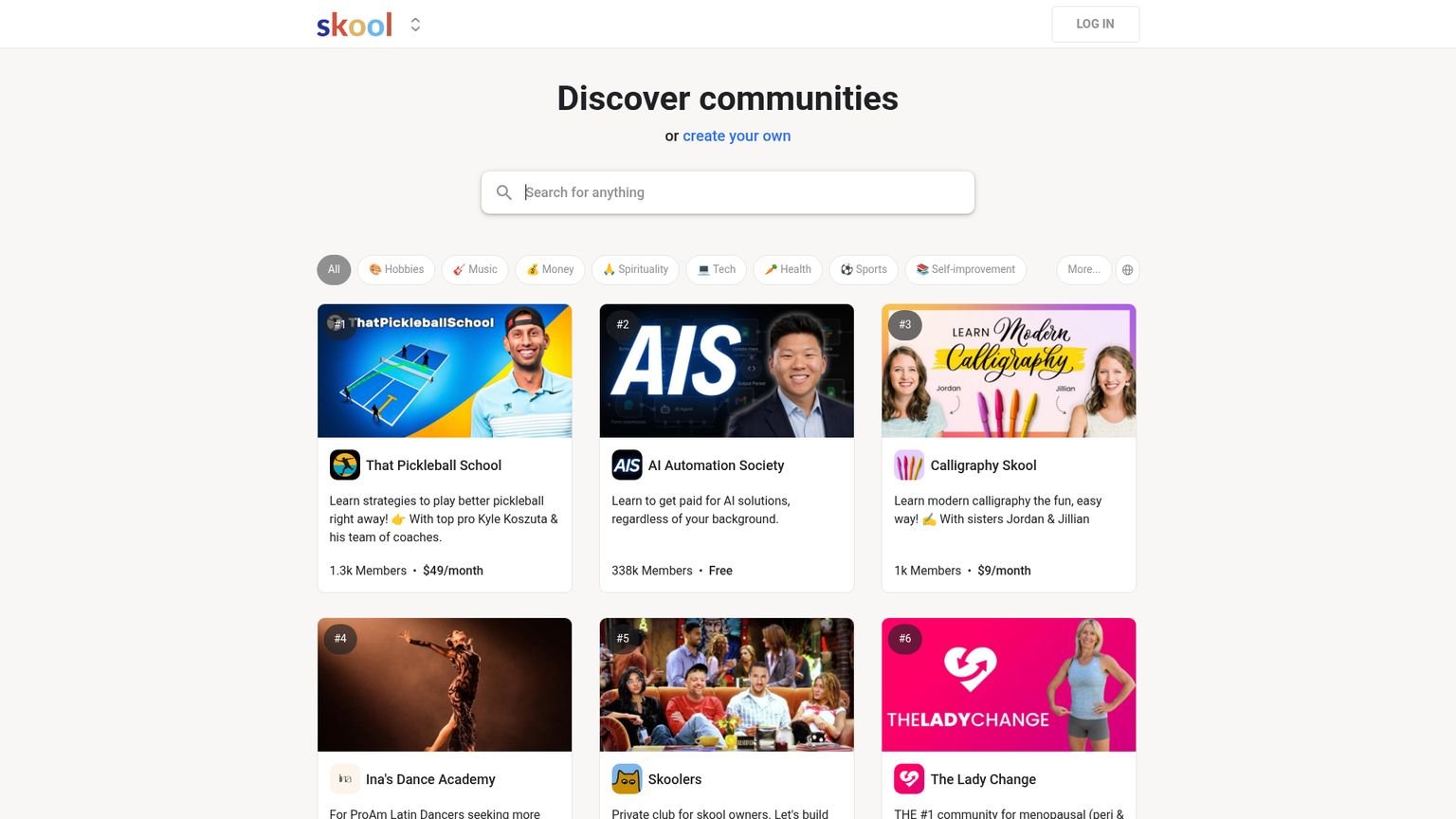
Compare the positioning directly:
| Community | Price | Focus | Members |
|---|---|---|---|
| Lupa AI Academy | Free | Tool-specific (upscaling) | ~280 |
| AI Video Bootcamp | $9/month | AI video business | 18,000+ |
| AI Automation Society+ | Paid | Automation workflows | 1,000+ |
In the AI upscaling tool category specifically, Lupa competes with Topaz Gigapixel AI and Magnific. Topaz has a one-time purchase model and more professional-grade features. Magnific leans toward creative AI manipulation. Neither offers a free community where you can learn workflows and get direct creator access.
That community layer is genuinely differentiated. Whether it matters depends entirely on whether you need hand-holding with the tool or you’d figure it out alone.
For a full breakdown of the Skool platform itself, see the Skool pricing guide and Skool community reviews.
Is Lupa AI Worth the Paid Plans?
At $4.90/month annually, the Lupa AI tool is worth it for occasional-to-regular upscaling where web-based access suits your workflow. The Trustpilot score of 4.5/5 from 190+ reviews confirms the output quality is real, independent of marketing claims (Trustpilot, April 2026). The decision comes down to volume and pipeline.
The $4.90/month Starter plan gives you 200 HD conversions monthly. For individual users doing occasional client work or personal projects, 200 conversions is more than enough. For photographers running batch jobs on event shoots or product catalogs, that limit fills up fast.
The Pro plan at $7.90/month adds batch processing and API access. Batch processing matters when you’re handling image collections. Uploading 40 product images one by one is not a workflow, it’s a time tax. API access opens integration with automated pipelines for developers or power users running Lupa as part of a larger system.
Value comparison against the competition: Topaz Gigapixel AI costs approximately $99/year as a one-time desktop purchase. For high-volume professional work with no need for the community or web-based convenience, Topaz offers better long-term economics. For casual or occasional use, Lupa’s lower monthly rate and free Academy support make it the more practical entry point.
The billing issues documented in user reviews are worth factoring in. If you subscribe, save your confirmation email, use direct email support rather than the chatbot if problems arise, and verify account credits after payment before assuming the plan is active.
Getting Started: Your First Week in Lupa AI Academy
Getting started is instant, no application, no fee, and no waiting period. The Skool platform processes signups in under two minutes. Go directly to the Classroom section after joining; structured tutorials live there, not in the community feed. According to MIT Open Learning (2023), learners who engage with structured curriculum in their first 48 hours complete courses at 3x the rate of those who browse passively.
Your first week priority list:
- Watch the basic upscaling walkthrough. Lupa is web-based, nothing to install. The Academy tutorial covers interface settings that aren’t self-evident.
- Run the face enhancement workflow. This is the technique that separates Lupa outputs from generic upscalers. Learn it early regardless of your primary use case.
- Browse community before-and-afters. Members share upscaled images regularly. Use them to calibrate expectations. 4x upscaling on a portrait photograph looks different than 4x on an architectural scan or an old damaged photo.
- Check the Photoshop integration module if you work in a larger editing pipeline. Skip it if you’re using Lupa as a standalone tool.
The learning curve for the core tool is genuinely low. Most users are producing clean upscaled images within 30 minutes of first use. The Academy’s value compounds over weeks. It’s the intermediate and advanced settings combinations that produce meaningfully better results for specific image types.
Who Should Join Lupa AI Academy?
The Academy has a clear ideal user and a clear non-fit. Getting that right saves you 10 minutes of confusion after joining.
Best for:
- Portrait photographers who want clean face enhancement at high upscale ratios
- E-commerce sellers cleaning up low-resolution product images
- Anyone restoring old, damaged, or degraded photographs
- Lupa AI subscribers who feel they’re using a fraction of the tool’s capability
- Researchers or buyers evaluating Lupa before committing to a paid plan
Skip if:
- You want AI business education, agency-building, or monetization training
- You haven’t tried any upscaling tools yet and just want general AI education
- You need a large, active community (280 members is the feature here, not the limitation)
- You’re already producing high-quality upscaling outputs and don’t need workflow support
Key Takeaways
- Price: Academy is free. Lupa AI tool starts at $4.90/month (annual) for 200 HD conversions; Pro plan at $7.90/month adds batch processing and API
- Rating: 3.6/5. The free community adds real value for Lupa users, but billing complaints and small community size limit the score
- Learning curve: Low. Web-based with no setup required; most users produce quality output within 30 minutes
- Biggest mistake: Paying for the tool before testing the free trial and checking upscaling output on your specific image types, portraits, product images, and old photos behave differently at the same settings
- What moves the needle: The face enhancement and skin texture workflows. These are what separate Lupa from generic upscalers and the techniques aren’t documented outside the Academy
Frequently Asked Questions
Is Lupa AI Academy free?
Yes. The Skool community is free with no monthly fee. The Lupa AI upscaler tool has paid plans starting at $4.90/month on annual billing for 200 HD conversions. You can join the community, access all tutorials, and browse 128+ community posts without spending a dollar.
What does Lupa AI actually do?
Lupa AI increases image resolution by up to 16x using machine learning, without the blurry output of traditional upscaling. It also handles skin enhancement, old photo restoration, AI image generation via the Nano Banana 2 model, and video upscaling for clips up to 29 seconds. Everything runs in the browser with nothing to install.
How many members does Lupa AI Academy have?
Roughly 280 members as of April 2026. That’s intentionally small. A focused group where questions get direct answers from the Lupa product team, not buried under hundreds of daily posts. The community has 128+ posts across those 280 members, a healthy engagement ratio.
Is Lupa AI better than Topaz Gigapixel?
Different tools for different users. Topaz Gigapixel is a desktop app with a one-time purchase and a longer professional track record. Lupa AI is web-based with subscription pricing and a free community for support. Lupa wins on accessibility and community access. Topaz wins on features and long-term cost at high volume. For casual users, Lupa is the simpler entry point.
Is Lupa AI Academy a scam?
No. It’s free, run by the actual Lupa AI product team, and has 280+ active members. Guille Kenzo is a verifiable creator based in Spain with a real product track record. The negative Trustpilot reviews focus on billing issues with the paid tool, not the community or content quality. The Academy carries zero financial risk.
Final Verdict
Lupa AI Academy is a solid free resource for anyone using or evaluating the Lupa AI upscaler. The community is small, focused, and run by the actual product team. The tutorials cover workflows the official documentation doesn’t. The Trustpilot score of 4.5/5 across 190+ reviews confirms output quality, and the billing complaints in the reviews are specific and recoverable, not signs of a broken product.
You won’t find business coaching or AI monetization training here. That’s not the point. This is a product support community that does exactly what it says.
Join the community. Test the free trial. Then decide on the paid tool from there.
Related Reading
Full pros & cons
- Completely free to join, no monthly cost unlike most Skool communities
- Direct access to the Lupa product team for questions and feedback
- 128+ posts covering advanced workflows the official docs don't address
- Tutorials for portrait enhancement, skin texture, and old photo restoration
- Small community means questions get answered, not buried
- Only 280 members, very small compared to most Skool communities
- Entirely tool-specific: no business education or monetization training
- Lupa AI billing issues reported (payments processing but accounts not updating)
- No live coaching or calendar events, text and video only
Try it yourself
Ready to put it to the test?
We may earn a commission at no extra cost to you. Affiliate disclosure.
Reader feedback
Was this review helpful?
Your feedback helps us write better reviews.
Thanks for your feedback.

AI Funnel Insider is an independent review site covering AI tools, Skool communities, and online courses. Every community and tool reviewed here is personally joined, paid for, and tested before a verdict goes live. Reviews are independent and may contain affiliate links, at no extra cost to you.
Related Posts

AI Advantage Summit Review 2026: Worth 9 Hours?
The AI Advantage Summit is free, runs 3 days, and stars Tony Robbins and Igor Pogany. Is it worth 9 hours, or just a pitch? Honest verdict.

AI Creator Bootcamp Review 2026: What $9/mo Gets You
AI Creator Bootcamp packs 13 courses, 165 modules, and 2,100+ members into $9/mo. My honest breakdown of the curriculum and who it is built for.

Buildy AI Review 2026: Is It Any Good?
Buildy AI builds apps from plain English, no code, free to join. What actually works, where it falls short, and my honest 2026 take.

Renegade AI Review: Worth $249?
Renegade AI promises 7 AI business modules on Skool for a one-time fee. But is it worth $249 in 2026? Honest review of the content quality inside.

AI Automation Agency Hub Review 2026: Free, But Good?
Liam Ottley's free Skool has 333k members and 60+ hours of training. Is the AI Automation Agency Hub actually worth your time in 2026?

Closer Academy Review 2026
Mike Barron's Closer Academy reviewed: the real pricing, curriculum quality, member complaints, and who should actually join in 2026, before you pay.
The Insider Newsletter
One honest review, every Sunday.
Get our weekly breakdown of which AI tools and Skool communities are worth buying. Built for marketers, founders & solopreneurs.